


Logitech G604 Review: Is It Still Worth It in 2026?
If you’ve ever switched between work and gaming on the same mouse, you already know the frustration: one moment you need fast precision for editing or FPS aiming, and the next you’re juggling browser tabs, shortcuts, and productivity tools. Most mice do one job well—but struggle when you try to make them do everything.
That’s exactly the gap the Logitech G604 LIGHTSPEED tries to fill. It’s not a flashy ultra-light esports mouse, and it’s not a basic office device either. Instead, it sits in a “hybrid” category that appeals to gamers, productivity users, and anyone who relies heavily on shortcuts and macros.
But here’s the real question users keep asking: is the G604 still worth buying today, especially when newer wireless mice keep coming out? And what about common concerns like driver support, firmware updates, alternatives, and how it compares to simpler models like the Logitech G305?
In this detailed guide, we’ll break down real-world usage, performance, macros, dimensions, wireless modes, and whether it still holds up in 2026.
What the Logitech G604 Actually Is (Not Just Specs)
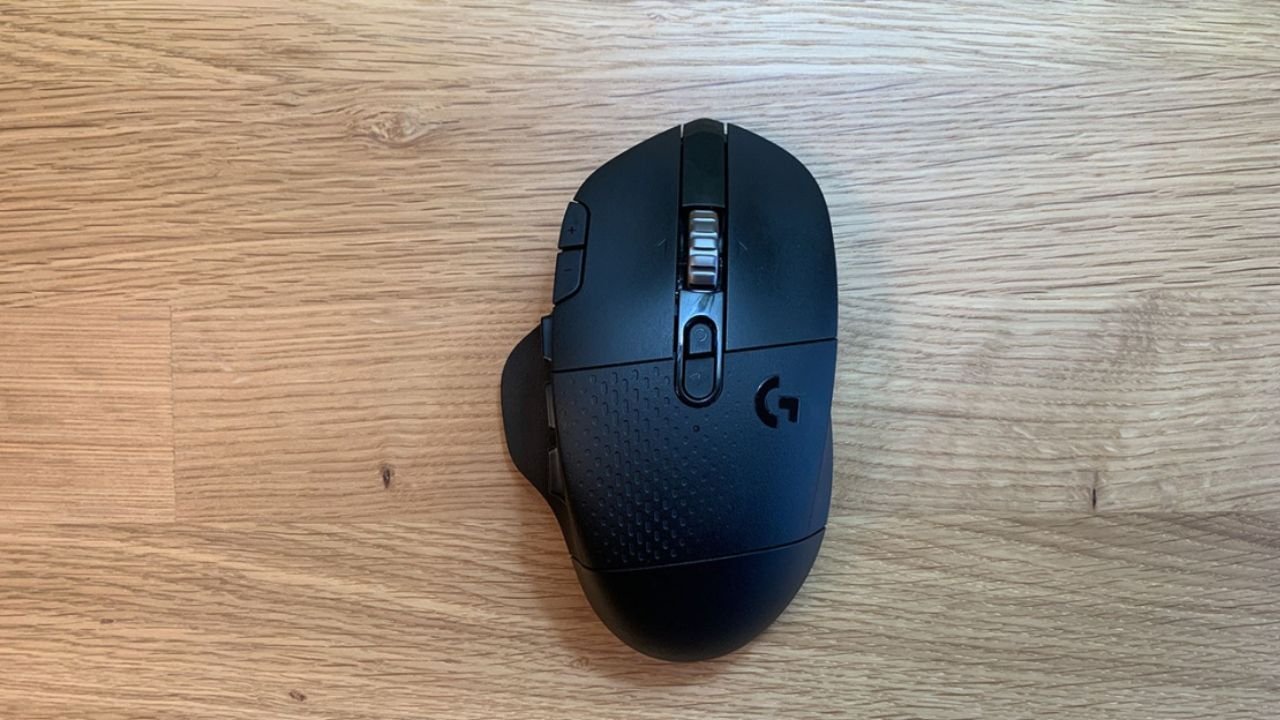
The Logitech G604 LIGHTSPEED is a wireless multi-button mouse designed for people who want control—not just cursor movement.
It combines:
- A high-precision HERO sensor (up to 16,000 DPI)
- Dual wireless: LIGHTSPEED (gaming-grade) + Bluetooth
- 15 programmable buttons
- A large ergonomic right-handed shape
- AA battery power (not rechargeable)
In real use, it feels less like a “competitive esports mouse” and more like a command center for your hand. Think of it as a productivity tool that can also game reasonably well.
This positioning matters, because your expectations will determine whether you love it or hate it.
Design & Dimensions: Built for Control, Not Speed
The G604 is noticeably larger and heavier than most modern gaming mice.
Approximate dimensions:
- Length: ~130.7 mm
- Width: ~80.1 mm
- Height: ~45.7 mm
- Weight: ~135g (with AA battery)
In practice, this means:
- Palm grip users feel at home immediately
- Claw grip users may adapt but won’t find it ideal
- Fingertip grip users will likely dislike it
The shape has a pronounced thumb rest on the left side, which is essential because that’s where the 6 side buttons are placed. After a few days, most users naturally start using those buttons without thinking.
However, the weight is where opinions split. In gaming, especially FPS titles, you can feel that it’s heavier than modern lightweight mice. But for productivity work, the weight actually makes it feel stable and controlled.
Wireless Performance: LIGHTSPEED vs Bluetooth
One of the biggest strengths of the G604 is its dual wireless system.
LIGHTSPEED Wireless
This is Logitech’s low-latency gaming connection. In real-world use:
- Feels identical to wired for most users
- No noticeable delay in FPS or MOBA games
- Stable even in crowded wireless environments
If you game seriously, this is the mode you’ll use.
Bluetooth Mode
Bluetooth is more for convenience:
- Slightly higher latency (not ideal for fast gaming)
- Excellent for laptops and travel
- Saves battery compared to LIGHTSPEED
A practical example:
Many users keep LIGHTSPEED on their gaming PC and switch to Bluetooth when using a laptop in meetings or browsing.
Logitech G604 Macros & Buttons: The Real Value
This is where the G604 becomes powerful.
It offers 15 programmable buttons, including:
- 6 thumb buttons
- DPI shift button
- Scroll wheel click + tilt functions
- Standard left/right click
Using Logitech G HUB software, you can assign:
- Keyboard shortcuts
- Complex macros
- App-specific commands
- Media controls
- Push-to-talk or gaming abilities
Real-world macro example:
A video editor might set:
- Cut / copy / paste
- Timeline zoom in/out
- Export shortcut
- Undo/redo
A gamer might use:
- Weapon switching
- Build commands
- Ping system
- Ability combos
After a few days, muscle memory kicks in, and you start relying on the thumb cluster heavily. This is the G604’s biggest strength—it reduces keyboard dependency.
Logitech G604 Driver & Software Support
The mouse uses Logitech G HUB software, which handles:
- DPI adjustment
- Button mapping
- Macro creation
- Profile switching per app/game
- Firmware updates
Common user experience:
- Setup is simple on Windows 10/11
- Profiles can auto-switch per application
- Occasional bugs in G HUB (rare but reported)
- Firmware updates are infrequent but stable when released
Logitech G604 update situation:
Logitech does not frequently update this model anymore because it’s older in the lineup. However:
- Firmware is stable
- No critical known issues requiring constant updates
- G HUB still fully supports it
In short: it’s a “set it and forget it” device once configured.
Logitech G604 Wireless Battery Life
Instead of a rechargeable battery, the G604 uses a single AA battery.
Battery life depends on mode:
- LIGHTSPEED: ~200–240 hours (typical use)
- Bluetooth: can last longer depending on usage
Real-world insight:
Most users report replacing the battery every 1–2 months with heavy use, or longer if using Bluetooth occasionally.
The downside is obvious: no USB-C charging.
But the upside is also real: you can swap batteries instantly and keep working.
Logitech G604 vs G305: Big Difference in Philosophy
This comparison comes up a lot.
Logitech G305
- Lightweight (~99g)
- Simpler design
- 6 buttons only
- HERO sensor
- More FPS-focused
Logitech G604
- Heavier (~135g)
- 15 buttons
- Dual wireless (Bluetooth + LIGHTSPEED)
- Designed for productivity + gaming hybrid use
Real takeaway:
- Choose G305 if you want competitive FPS performance and simplicity
- Choose G604 if you want control, macros, and multitasking power
They are not direct competitors—they serve different users.
Logitech G604 Alternatives (2026 Perspective)
Since the G604 is aging, alternatives matter.
1. Razer Basilisk X Hyperspeed
- Similar hybrid concept
- Fewer buttons
- More modern feel
2. Logitech G502 X LIGHTSPEED
- More updated sensor
- Better ergonomics for many users
- Still macro-focused
3. Corsair Dark Core RGB Pro
- Strong wireless performance
- Good for palm grip users
- Slightly heavier feel
4. Logitech MX Master 3S (Productivity alternative)
- Best for office/macros
- Not ideal for FPS gaming
- Superior scroll wheel experience
Key insight:
Most modern alternatives either:
- Reduce buttons for lighter weight
- Or shift fully into productivity (MX series)
The G604 remains one of the last “true hybrid MMO-style wireless mice.”
Real-World Usage: Who Should Actually Buy It?
Good fit for:
- Programmers using shortcuts heavily
- Video editors (Premiere, DaVinci Resolve)
- MMO/MOBA gamers
- Users who want one mouse for work + gaming
- People who prefer palm grip
Not ideal for:
- Competitive FPS players
- Ultra-light mouse fans
- Small hand users
- Minimalist setups
Common Problems Users Report
To keep it realistic, here are the real complaints:
- Slightly heavy for fast gaming
- G HUB software can be inconsistent
- No rechargeable battery
- Not the newest sensor generation
- Large size doesn’t fit small hands
However, none of these are dealbreakers depending on your use case.
Final Verdict: Is Logitech G604 Still Worth It?
The Logitech G604 is not a “modern esports mouse,” and it was never meant to be.
Instead, it remains one of the most practical hybrid mice ever made. Its strength is not speed—it’s control, customization, and flexibility.
If you need a mouse that can:
- Handle gaming reasonably well
- Replace keyboard shortcuts in workflows
- Switch between laptop and desktop easily
- Offer deep macro customization
Then the G604 still holds value in 2026.
But if your focus is pure competitive gaming or ultra-light design, newer alternatives will suit you better.
Outing Club we explore gaming trends, gameplay experiences, and the latest titles that shape the gaming world. We bring simple insights and updates to help gamers enjoy and understand their favorite games better.