


Razer Orbweaver: Is This Gaming Keypad Still Worth It?
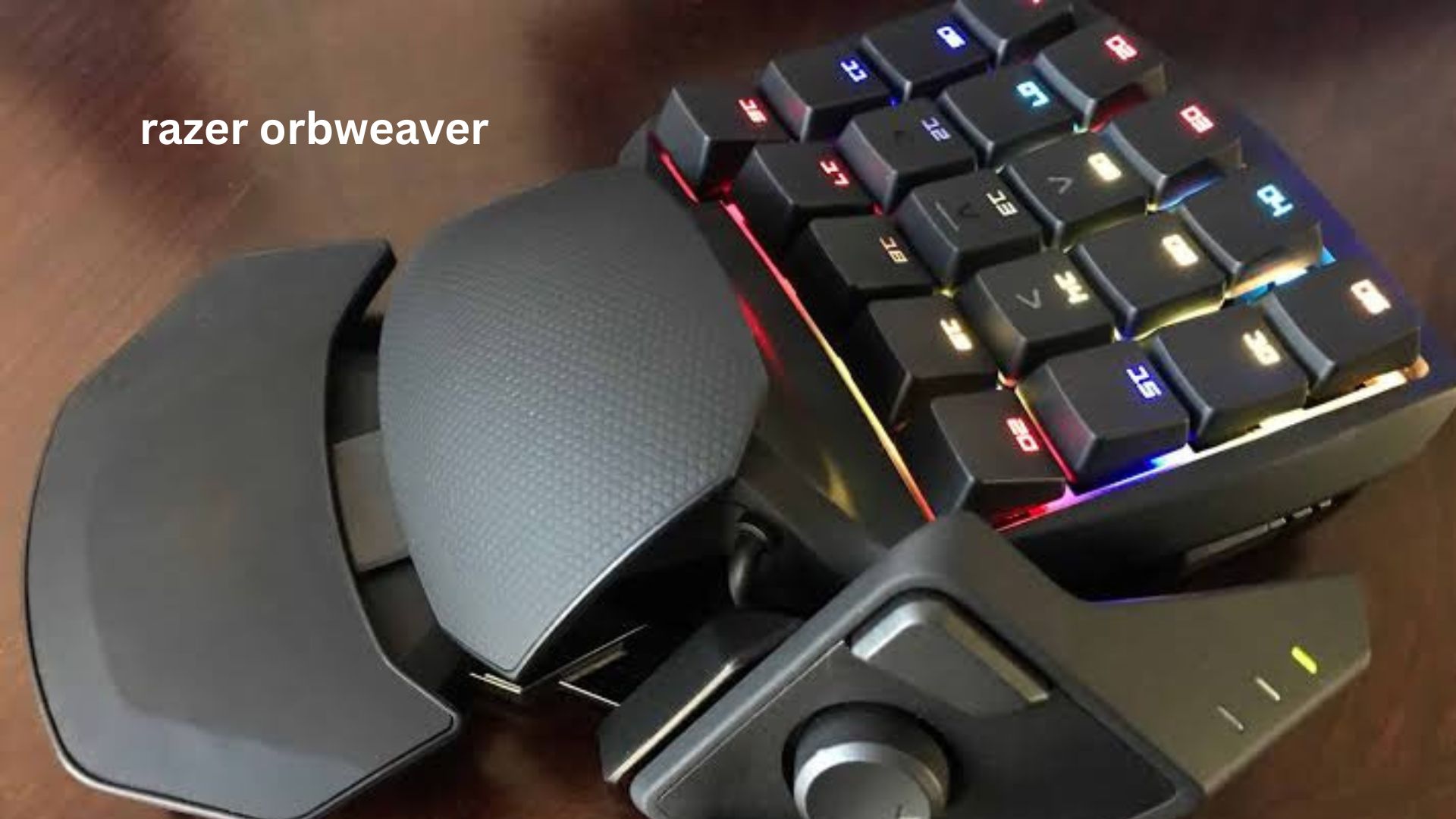
If you have ever tried to play an MMO, MOBA, or complex PC game with a normal keyboard, you probably know the problem: your left hand spends too much time reaching for keys, while your thumb is doing almost nothing. The Razer Orbweaver was designed to solve exactly that problem.
Instead of giving you a full keyboard, the Orbweaver puts a compact cluster of programmable mechanical keys under your fingers and adds a thumb-controlled directional pad. The result is a very different way to control PC games—especially when you need many commands close together.
But there is an important catch in 2026. The Orbweaver is an older product, and its software ecosystem is no longer as straightforward as it once was. Razer’s current support documentation still provides specifications and help for the Orbweaver Chroma, but the device is tied to Razer Synapse 2, while Razer has moved its newer ecosystem toward Synapse 4.
So, is the Razer Orbweaver still a smart buy? This guide looks beyond the specification sheet and explains what it is genuinely good at, where it struggles, and what you should check before buying one today.
What Is the Razer Orbweaver?
The Razer Orbweaver is a dedicated gaming keypad designed to replace the left-hand portion of a conventional keyboard.
Rather than moving between dozens of keyboard keys, you rest your hand on the Orbweaver and use a concentrated group of programmable buttons. It was originally aimed at FPS, RTS, and MMORPG players who wanted more commands immediately accessible.
The standard Orbweaver has:
- 20 fully programmable mechanical keys
- An 8-way directional thumbpad
- A programmable thumb button
- Adjustable thumb positioning
- An adjustable palm and wrist rest
- Backlit keys
- Programmable profiles and macros
- A compact ergonomic design
Razer’s official specifications list the Orbweaver at approximately 202 × 154 × 55 mm and 300 grams, while the Orbweaver Chroma weighs about 395 grams.
The important distinction is that Orbweaver and Orbweaver Chroma are not exactly the same model. The Chroma version adds customizable Chroma lighting and uses Razer’s Chroma ecosystem.
Razer Orbweaver Key Features Explained
Specifications only tell part of the story. The real appeal of the Orbweaver comes from how these features work together.
20 Programmable Mechanical Keys
The central key cluster is the heart of the device.
Each key can be assigned to different commands, allowing you to move actions that would normally require awkward keyboard reaches directly underneath your fingers.
For an MMO, for example, you could assign:
- Movement-related commands
- Abilities
- Inventory
- Target selection
- Push-to-talk
- Mount or vehicle controls
- Frequently used shortcuts
The advantage is not simply having more buttons. It is reducing the distance your fingers travel.
That distinction matters.
A player who rarely uses more than WASD plus a few shortcuts may gain little from the Orbweaver. Someone constantly switching between 15–25 commands can benefit much more.
The 8-Way Thumbpad
The thumbpad is arguably the most distinctive part of the Orbweaver.
Razer designed it as an 8-way directional control, and the company says it can be customized for navigation, commands, or macros. The buttons around the thumbpad can also be reassigned.
This creates an interesting alternative to conventional WASD controls.
Your fingers can remain over the main key cluster while your thumb handles another directional input.
For certain games, that can feel surprisingly natural.
Adjustable Ergonomics
The Orbweaver isn’t shaped like a normal keyboard that happens to have fewer keys.
Its palm rest, thumb module, and wrist positioning are adjustable. Razer specifically designed the device so the hand position could be adapted to different hand sizes.
This is one of the features that deserves more attention than RGB lighting.
If your hand fits the device properly, the keypad can feel much more comfortable than repeatedly stretching across a traditional keyboard.
If it does not fit your hand, however, the unusual layout can become frustrating.
Razer Orbweaver vs a Normal Keyboard
The biggest question is whether you actually need a gaming keypad.
A conventional keyboard remains better for general computer use because it provides:
- Full typing functionality
- Dedicated function keys
- Number row
- Navigation keys
- Familiar layouts
- Easier compatibility
The Orbweaver instead focuses on left-hand control.
| Feature | Razer Orbweaver | Traditional Keyboard |
|---|---|---|
| Gaming controls | Excellent | Good |
| Number of accessible gaming commands | High | High |
| Typing | Poor | Excellent |
| Thumb control | 8-way pad | Usually none |
| Ergonomic adjustment | Extensive | Usually limited |
| Desk space | Smaller | Larger |
| General productivity | Limited | Excellent |
| Learning curve | Moderate | Very low |
The Orbweaver therefore shouldn’t be thought of as a keyboard replacement in the usual sense.
It works better as a specialized control surface used alongside your mouse and, when necessary, another keyboard.
Who Should Use the Razer Orbweaver?
The best candidates are players who frequently use complex control schemes.
MMO Players
MMORPGs are probably the most obvious use case.
When your character has numerous abilities, items, mounts, targeting commands, and utility actions, having those commands close to your fingers can reduce unnecessary movement.
The Orbweaver can be especially useful when your mouse already handles camera movement and targeting.
MOBA Players
MOBA games can also benefit from a keypad because players often need rapid access to abilities, items, communication commands, and other shortcuts.
The thumbpad gives you another input method without forcing your fingers away from the main key cluster.
Simulation Games
Simulation titles can contain enormous numbers of commands.
Flight simulators, space games, strategy games, and other control-heavy software can make better use of programmable keys than ordinary action games.
Productivity and Creative Work
This is an underrated use case.
The Orbweaver doesn’t have to be used only for gaming.
You can assign repetitive shortcuts to its buttons for applications such as:
- Video editing
- 3D software
- Audio production
- Graphic design
- CAD
- Streaming
For example, a frequently used editing shortcut could be assigned to a nearby key rather than repeatedly reaching for a complicated keyboard combination.
Who Should Avoid the Orbweaver?
The Orbweaver isn’t automatically better than a keyboard.
You may want to avoid it if:
- You primarily play casual games.
- You rarely use more than a few shortcuts.
- You frequently type while gaming.
- You dislike unusual key layouts.
- You want modern software support.
- You expect plug-and-play compatibility with every operating system.
There is also a practical problem with buying an older Orbweaver today: software support should be considered before hardware condition.
The Biggest Problem in 2026: Software Support
This is where buying a Razer Orbweaver requires more caution.
Razer’s current support page identifies the Orbweaver Chroma as a Synapse 2-enabled device.
Meanwhile, Razer has officially moved on from Synapse 3. As of February 3, 2026, Synapse 3 no longer receives updates or cloud services, with Razer directing users toward Synapse 4.
That creates an important distinction:
The hardware can still be useful even when its original software ecosystem is aging.
This is one reason buying a used Orbweaver is different from buying a current gaming keypad.
Before paying for one, verify exactly which model you’re getting and what software functionality you need.
Don’t assume that because another Razer keyboard works with a newer Synapse version, the Orbweaver will behave the same way.
Razer itself notes that Synapse 2-exclusive devices do not synchronize with Synapse 3 or Synapse 4 in the same way as newer supported hardware.
A Practical Setup That Makes the Orbweaver Better
One common mistake is trying to assign every available button immediately.
That usually creates confusion rather than speed.
A better approach is to build your layout gradually.
Step 1: Start With Familiar Controls
Keep your most important movement or action keys in positions that feel intuitive.
Don’t redesign everything on day one.
Step 2: Put High-Frequency Commands Closest to Your Fingers
Your most frequently used commands should require the least finger movement.
Reserve harder-to-reach buttons for less frequent actions.
Step 3: Give the Thumbpad a Specific Job
Don’t assign random commands to the thumbpad simply because you can.
Use it for something meaningful, such as:
- Movement
- Camera/navigation functions
- Menu navigation
- Secondary controls
Step 4: Add Macros Carefully
Macros can be useful, but they aren’t always appropriate.
Some games restrict automation or particular macro behaviors. Always check the rules of the game you’re playing before relying on macros.
Step 5: Practice Before Competitive Play
A new layout can initially make you slower.
Spend some time in a low-pressure environment until your fingers begin finding the controls automatically.
Three Less-Obvious Things to Know
1. More Keys Don’t Automatically Make You Faster
This sounds obvious, but it’s easy to overlook.
The Orbweaver’s advantage isn’t the raw number of buttons. Its real advantage is hand positioning.
If your fingers already reach your necessary commands comfortably, adding more programmable keys may provide almost no benefit.
The device becomes valuable when it eliminates repeated awkward reaches.
2. The Thumbpad Changes How You Think About Movement
Most keyboard players instinctively associate movement with four fingers.
The Orbweaver gives your thumb a meaningful directional role.
That can free your other fingers for actions that would otherwise interrupt movement.
This is particularly interesting in games where simultaneous movement and additional commands are important.
3. Used Condition Matters More Than Cosmetic Condition
When purchasing an older Orbweaver, don’t be distracted by a perfect-looking chassis.
Test:
- Every mechanical key
- Thumbpad directions
- Thumb button
- Spacebar actuator
- Palm-rest adjustment
- USB connection
- Backlighting on Chroma models
- Software detection
A clean-looking used unit with one unreliable switch can be much worse value than a cosmetically worn unit that works perfectly.
Common Razer Orbweaver Problems
Older gaming peripherals naturally have some potential trouble spots.
Software Detection
An Orbweaver may function as an input device while still having problems with its configuration software.
That distinction is important.
If basic key presses work but macros, lighting, or custom profiles don’t, the issue may be software compatibility rather than a dead keypad.
Key Wear
Mechanical switches can last a long time, but an older device has had years to accumulate use.
Test every key individually.
Don’t assume that a switch that “feels okay” is registering reliably.
Thumbpad Wear
The thumbpad deserves particular attention when buying second-hand.
It is used heavily because it is positioned under your thumb, and problems with one directional input can be surprisingly disruptive.
Profile Problems
If you rely heavily on custom profiles, make sure you understand where those configurations are stored and which Razer software version supports your device.
The older the peripheral, the more important this becomes.
Is the Razer Orbweaver Still Worth Buying?
Yes—but only for the right person.
The hardware concept remains compelling because the Orbweaver solves a problem that ordinary keyboards don’t solve particularly well: putting a large number of gaming commands into a compact, ergonomic left-hand control area.
Its mechanical keys, adjustable hand positioning, programmable thumbpad, and profile functionality remain useful. Razer continues to maintain support documentation for the Orbweaver and Orbweaver Chroma, which is better than simply abandoning the product entirely.
However, the age of the platform changes the buying decision.
If you’re purchasing a used unit cheaply and you’re comfortable dealing with older Razer software, it can still be an excellent specialist gaming keypad.
If you want the latest software ecosystem, modern compatibility, and long-term manufacturer support, an older Orbweaver is a much harder recommendation.
How to Decide Before Buying
Ask yourself five questions:
- Do I actually need more gaming controls?
- Would a thumbpad improve my current control scheme?
- Am I comfortable learning a different layout?
- Can I verify the exact Orbweaver model?
- Does its software support match the way I intend to use it?
If you answer yes to most of these, the Orbweaver makes considerably more sense.
If you mainly want a compact keyboard because you have limited desk space, there are simpler options.
FAQ
Is the Razer Orbweaver still supported?
Razer still maintains official support and specification pages for both the original Orbweaver and Orbweaver Chroma. However, the Orbweaver Chroma is listed as Synapse 2-enabled, so its software situation is different from newer Razer peripherals.
Is the Razer Orbweaver good for MMOs?
Yes, MMOs are one of the strongest use cases for the Orbweaver. Its programmable keys allow many abilities and shortcuts to sit close to your fingers, while the thumbpad provides another control method. It is particularly useful for players who regularly use many commands.
Can you use the Razer Orbweaver for productivity?
Yes. You can assign keyboard shortcuts and other commands to its programmable buttons, making it potentially useful for editing, creative applications, streaming, and other repetitive workflows. Its value depends on whether you have enough frequently repeated shortcuts to justify learning a dedicated keypad.
Does the Razer Orbweaver work with Mac?
Basic device functionality may differ from software features. Razer specifically states that the Orbweaver Chroma’s joystick function is supported on Windows and is not compatible with Mac.
Should I buy a used Razer Orbweaver in 2026?
It can be worthwhile if you find one in good working condition at a sensible price and understand the older software requirements. Test every key, the thumbpad, adjustment mechanisms, and software functionality before committing. If modern software support is your priority, consider a newer gaming keypad instead.
Final Verdict
The Razer Orbweaver is an unusual piece of gaming hardware, and that is both its biggest strength and its biggest limitation.
It isn’t designed to replace your keyboard. It is designed to make your left hand more efficient by putting important controls exactly where your fingers and thumb can reach them.
For MMO players, simulation enthusiasts, power users, and anyone who needs many shortcuts, that design can still make sense years after the product’s original release.
The bigger concern today is not the fundamental hardware design—it is the aging software ecosystem. If you understand that limitation and find a well-maintained unit, the Orbweaver can still be a remarkably capable specialist keypad.
If you’re buying one used, prioritize working switches, a healthy thumbpad, and software compatibility over appearance. That is the difference between finding a great older peripheral and buying a frustrating relic.