

SteelSeries Apex 3 TKL Review: Worth It for Gaming?
If you’ve been searching for a reliable gaming keyboard but don’t want to spend a fortune on mechanical switches, the SteelSeries Apex 3 TKL often comes up as a “safe choice.” But that’s exactly where many buyers get stuck—safe doesn’t always mean good, especially for gaming.
A lot of people looking at the Apex 3 TKL are usually in the same situation: they want something compact, durable, and comfortable for long gaming sessions, but they also don’t want loud mechanical switches or a complicated setup. Maybe you’re upgrading from a basic office keyboard, or maybe you’re trying to build a budget gaming setup where every purchase matters.
The real question is: does the SteelSeries Apex 3 TKL actually deliver a good gaming experience, or is it just a budget-friendly compromise?
After spending time with this keyboard in real gaming and typing scenarios—from FPS matches to long typing sessions—the answer is more interesting than a simple yes or no. Let’s break it down in a practical, experience-driven way so you can decide if it fits your needs.
What is the SteelSeries Apex 3 TKL?
The SteelSeries Apex 3 TKL is a tenkeyless (TKL) wired gaming keyboard designed by SteelSeries. “TKL” means it removes the number pad on the right side, making the keyboard more compact and giving your mouse more room—something FPS gamers especially appreciate.
Unlike mechanical keyboards, the Apex 3 TKL uses membrane switches. That immediately sets expectations: it is quieter, softer, and more office-friendly, but it won’t give the same tactile “click” or fast response of mechanical switches.
This keyboard sits in the budget category of gaming peripherals, designed for entry-level and mid-range gamers who want RGB lighting, gaming features, and durability without paying premium mechanical keyboard prices.
Design and Build Quality: Simple but Practical
At first glance, the Apex 3 TKL doesn’t scream “premium gaming gear.” But once you actually start using it, the design choices begin to make sense.
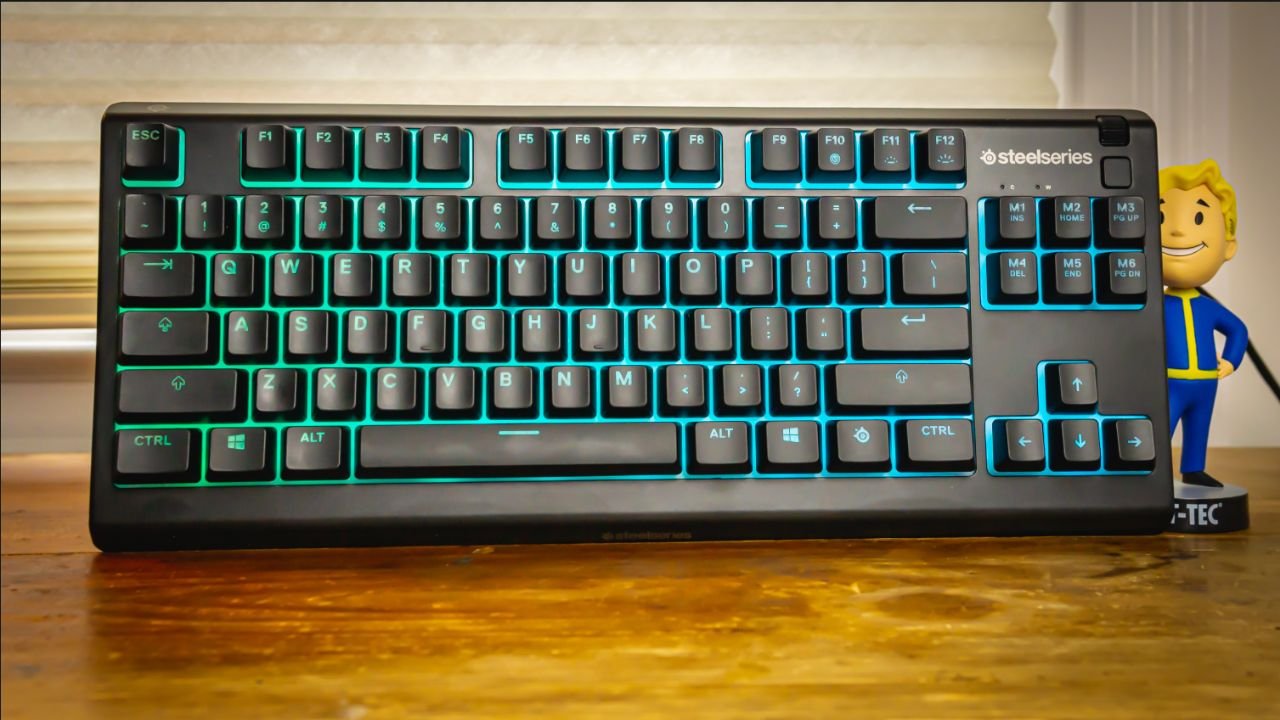
The keyboard has a matte black finish with a clean layout. It doesn’t feel flashy, but it does feel purposeful. The frame is plastic, yet surprisingly sturdy for daily use. It doesn’t flex much even when you press down firmly during intense gaming moments.
One of the standout design features is its water resistance. SteelSeries markets it as spill-resistant, which in real-life usage is more useful than it sounds. If you’ve ever knocked over a drink mid-game, you’ll understand why this matters. While it’s not meant to be fully waterproof, it can survive minor accidents like spilled water or soda better than most mechanical keyboards in this price range.
The TKL layout is also a big plus. It saves desk space and makes mouse movement smoother, especially in competitive shooters like Valorant or CS-style games where arm movement matters.
Typing Experience: Quiet but Soft
The Apex 3 TKL uses membrane switches, and this is where opinions usually split.
On the positive side, the keyboard is extremely quiet. If you game at night or share your room with others, this is a big advantage. You won’t get the loud clicking sound of mechanical switches.
Typing feels soft and slightly cushioned. It’s comfortable for long sessions, especially if you’re writing, chatting, or doing general browsing.
However, there is a trade-off. The keys feel less precise compared to mechanical keyboards. There’s a “mushy” bottom-out feeling that some gamers may not like, especially in fast-paced competitive gaming where feedback matters.
In real usage, you get used to it after a few days, but if you’ve already used mechanical keyboards before, you will notice the difference immediately.
Gaming Performance: Good for Casual to Mid-Level Play
This is where the Apex 3 TKL becomes interesting.
For casual gaming and even mid-level competitive play, the keyboard performs well. Input registration is reliable, and there is no noticeable lag since it is a wired keyboard.
In FPS games, the compact TKL design helps a lot with mouse movement. You can position your mouse closer to your keyboard, giving you more freedom for fast flicks and aiming adjustments.
In RPGs and MOBA games, the soft membrane keys actually feel comfortable for long sessions where constant rapid clicking isn’t required.
However, in ultra-competitive environments where every millisecond matters, mechanical keyboards still have an edge. The Apex 3 TKL doesn’t provide that sharp actuation or fast rebound that pro gamers often prefer.
So the honest breakdown is:
- Great for casual gaming
- Good for mid-level competitive gaming
- Not ideal for hardcore esports-level performance
RGB Lighting and Software Experience
The RGB lighting on the Apex 3 TKL is one of its most attractive features. It supports per-zone illumination, meaning you can customize sections of the keyboard rather than individual keys.
Through SteelSeries’ software (SteelSeries GG), you can adjust lighting effects, sync it with games, or create custom profiles.
In real use, the RGB is bright and even. It looks especially good in a dark room, and the lighting diffuses nicely under the keycaps.
The software is fairly easy to use compared to some competitors. It’s not overly complicated, and even beginners can set up profiles within a few minutes.
Comfort and Long-Term Use
One area where the Apex 3 TKL performs surprisingly well is comfort.
The keyboard includes a magnetic wrist rest (on some versions), which makes long typing or gaming sessions easier on your wrists. This is especially helpful if you spend hours at your desk.
The keys are low-noise, and the soft membrane feel reduces finger fatigue compared to harder mechanical switches.
However, after extended use, some users may notice a lack of tactile feedback. This doesn’t cause discomfort, but it can reduce typing “confidence” for fast typists.
Durability: Built for Everyday Gaming
SteelSeries designed this keyboard to last longer than typical budget keyboards.
The key switches are rated for millions of keystrokes, and the spill-resistant design adds extra protection.
In everyday use—gaming, typing, browsing—it holds up well without key wobble or performance drop.
Still, it’s important to understand that it is not a heavy-duty mechanical board. If you want something that lasts 7–10 years under heavy esports use, mechanical options are still better.
Price and Value for Money
The SteelSeries Apex 3 TKL is positioned in the budget gaming keyboard category. The exact price varies depending on region, but it generally sits in the affordable range compared to mechanical TKL keyboards.
This makes it attractive for:
- Beginner gamers
- Students building their first setup
- Users upgrading from basic office keyboards
- People who prefer quiet typing
When evaluating value, you’re paying for:
- Brand reliability from SteelSeries
- RGB lighting
- Spill resistance
- Comfortable typing experience
- Compact TKL design
But you are not paying for mechanical switch performance.
So the value is strong—if you understand what you are getting.
Release Date and Market Position
The Apex 3 TKL was released as part of SteelSeries’ expansion of its budget-friendly Apex lineup. It was designed to bring gaming features like RGB and TKL layout to a lower price segment, making it accessible to a wider audience.
Since its release, it has remained popular because it fills a specific gap: a gaming keyboard that looks modern, feels comfortable, and stays affordable.
Pros and Cons
Pros
- Very quiet typing experience
- Affordable gaming keyboard
- Compact TKL layout saves space
- Good RGB lighting system
- Spill-resistant design
- Comfortable for long use
Cons
- Membrane switches lack tactile feedback
- Not ideal for esports-level competitive gaming
- Plastic build (not premium feel)
- RGB is zone-based, not per-key
Who Should Buy the Apex 3 TKL?
This keyboard is best suited for:
- Casual gamers who play a few hours a day
- Students or office users who also game
- Users who prefer quiet keyboards
- People building a budget gaming setup
- Players upgrading from basic keyboards
It is NOT ideal for:
- Competitive esports players
- Mechanical keyboard enthusiasts
- Users who want ultra-fast key response
Final Verdict
The SteelSeries Apex 3 TKL is not trying to compete with high-end mechanical gaming keyboards—and that’s actually its strength. It knows its place in the market and delivers a balanced, comfortable, and affordable experience.
If you want a quiet, reliable, and visually appealing gaming keyboard without breaking your budget, it is a solid choice. But if your priority is competitive performance and tactile precision, you will eventually want to move toward a mechanical keyboard instead.
In short, it’s a “comfort-first gaming keyboard,” not a “performance-first esports tool”—and that distinction is what makes all the difference.
Outing Club we explore gaming trends, gameplay experiences, and the latest titles that shape the gaming world. We bring simple insights and updates to help gamers enjoy and understand their favorite games better.